Downloads
1,653,261 Trending
Avg. Rating
Compatibility Score
A+ #1 In Widgets Plugins
Tested up to
WordPress 6.9.4

Why Should You Use Content Aware Sidebars?

Fastest Widget Area Plugin

Looking for a custom sidebars solution that doesn’t slow down your site?

Content Aware Sidebars is built to scale and excels in performance no matter how big your site is, or how many sidebars and widget areas you create.

Robust & Secure Widget Logic

Feeling uneasy when plugins prompt you to enter widget logic PHP code?

It’s a bad and dangerous practice that we don’t allow in Content Aware Sidebars. Instead we included extensive, flexible Display Conditions you can choose from.

All-In-One Widget Manager

This is not just yet another WordPress Sidebar Plugin.

Our innovative features take widget areas to the next level. Content Aware Sidebars gives you full control over how, when, and where you want to display widgets.

Introducing Sticky WordPress Sidebars & Widget Areas ProNew

Sidebars For Different Pages

Dynamic, tailored widget areas and footers.

Do you want to display a sidebar on specific posts, pages, custom post types, or taxonomy archives? How about on posts:

  • with select Categories or Tags?
  • from a given Month or Date?
  • … and written by a featured Author?

Then you will love Content Aware Sidebars.
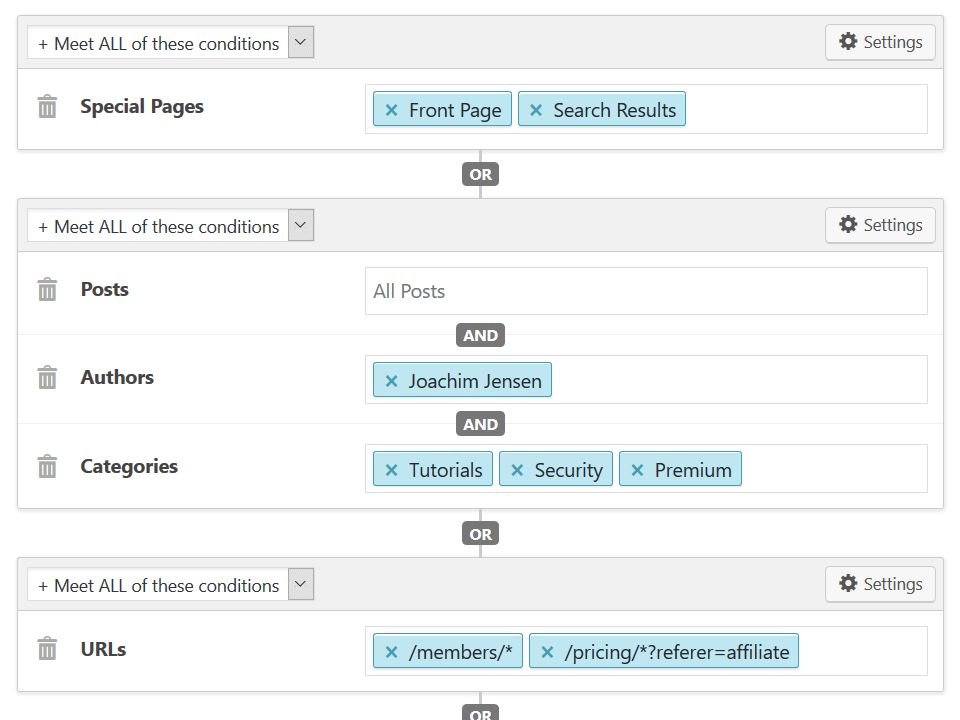
Content Aware Sidebars has the most Display Conditions

Unlimited WordPress Sidebars

Create, activate, and just add Widgets.

Add as many custom sidebars and widget areas you want, and display them on as many different conditions you want.

It only takes a few clicks in the user friendly sidebar manager, and we promise you never have to write a single line of code.
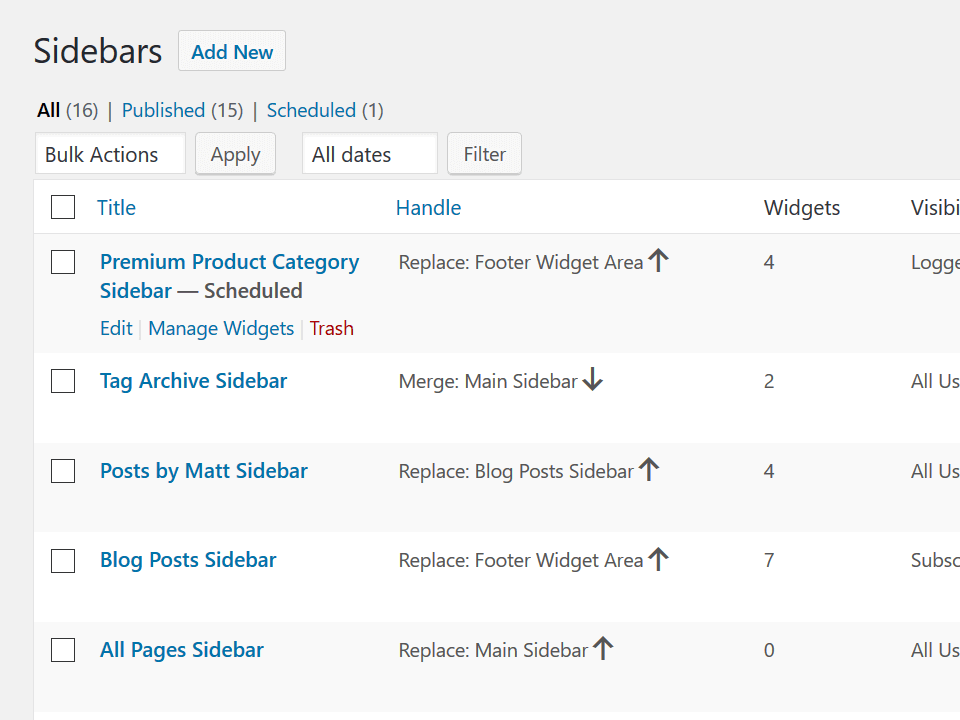
Screenshot of Sidebar Manager

Make your widget areas sticky with the click of a button. Just like this.

Display Widgets In Columns Pro

No-bloat Widget Area Designer.

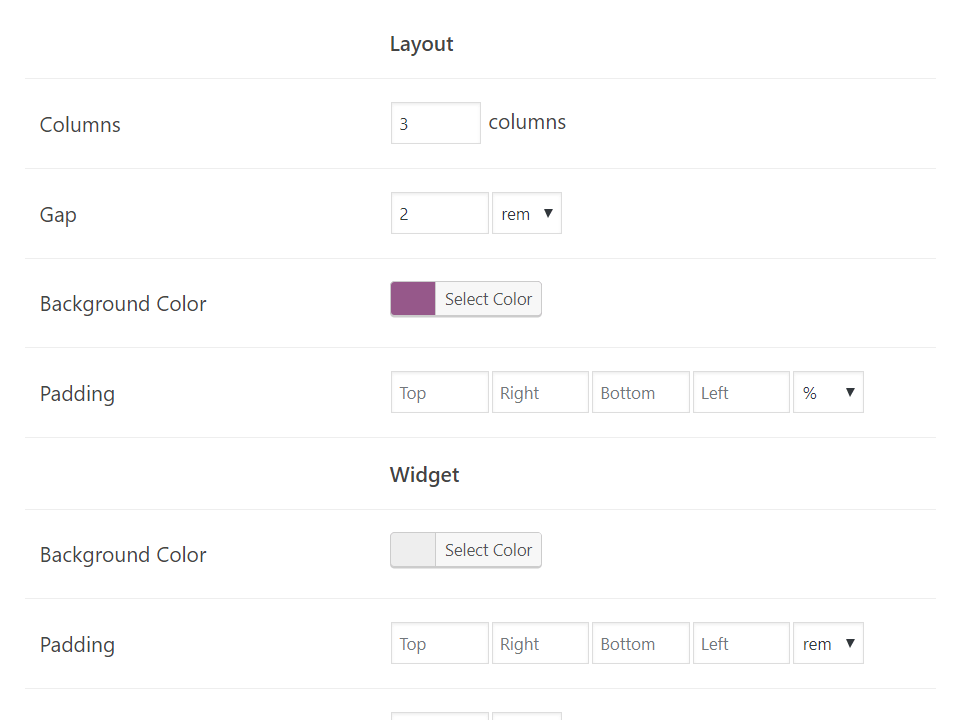
Create beautiful designs for any widget area and display widgets in up to 12 responsive columns.

By utilizing highly optimized CSS on demand, Content Aware Sidebars will make sure your WordPress sidebars look amazing in all modern browsers.
Read More »

Screenshot of Widget Area Designer

Infuse Sidebars Into Themes Pro

Display widget areas in WordPress hooks.

Content Aware Sidebars is the first plugin to let you insert new widget areas into theme locations previously not possible!

You can replace theme sidebars, use sidebar shortcodes, and now also add widget areas above or below the content, above or below the footer, or in any theme hook.
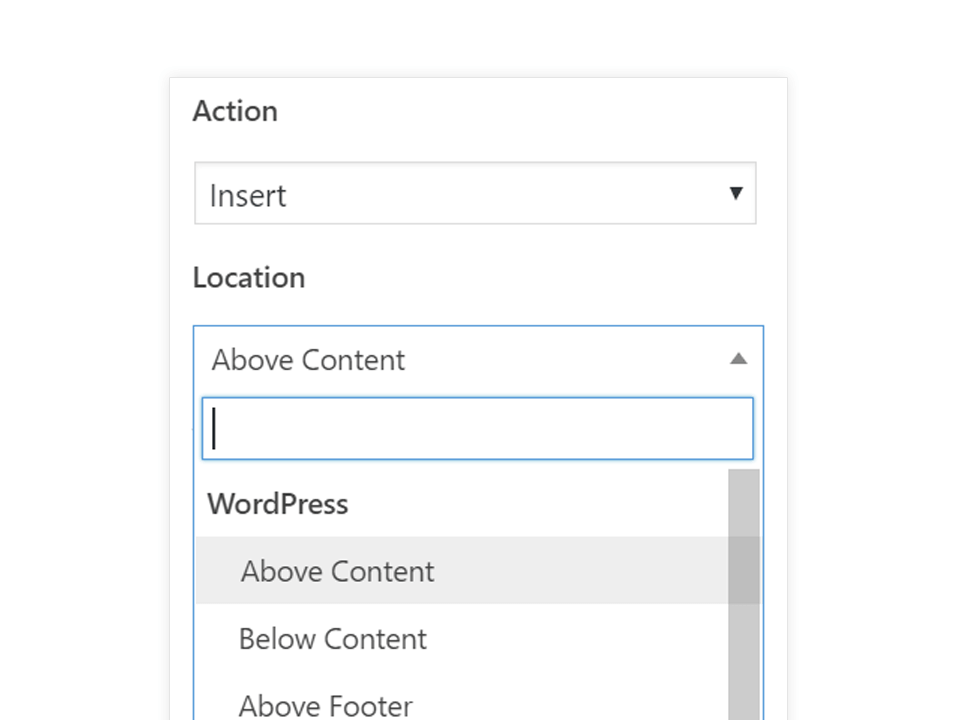
Screenshot of Widget Area in Theme Hook

Automatic Widgets Backup Pro

Manage and edit your widgets worry-free.

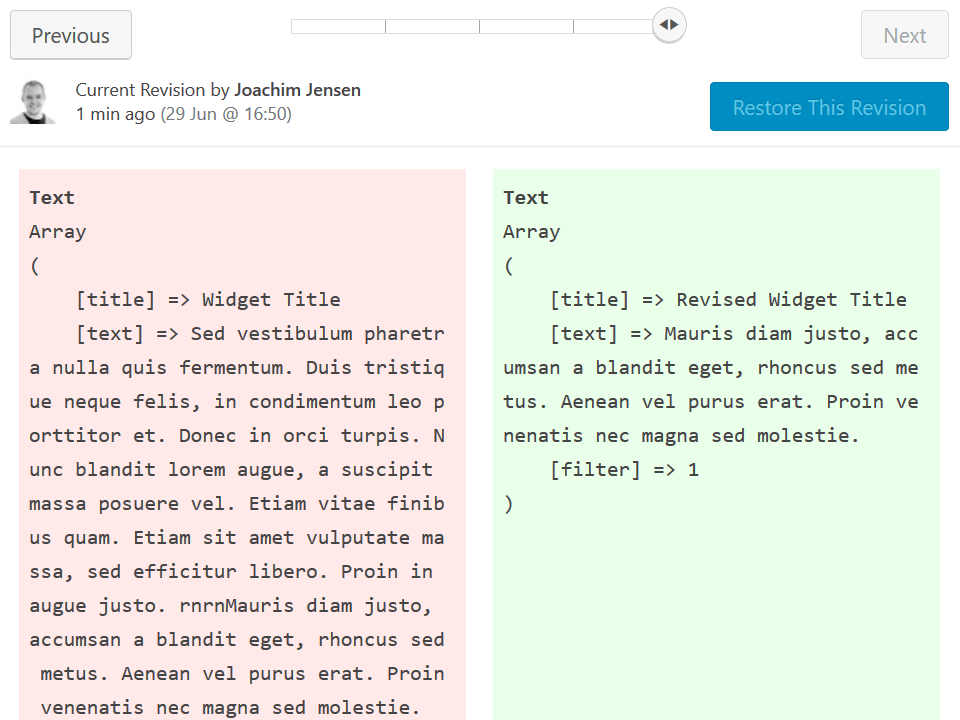
Can you imagine deleting an important widget by accident? You can now go back in time and instantly restore it; no need to manually download a backup first!

Content Aware Sidebars also adds a timeline of all widget edits, so you can compare widget revisions side-by-side.

Read More »

Screenshot of widget revisions

Start Creating Tailored WordPress Sidebars NOW

Display a new sidebar or widget area on any page in 60 Seconds or less.

Ssc: Service Utility 450 __full__

The primary feature that clears the "maintenance required" error and unlocks the printer.

Turn your printer off and then back on. The error message should be gone. Important Considerations and Warnings

The SSC Service Utility 450 finds applications across various sectors within the automotive industry, including:

Epson cartridges use smart chips to estimate ink levels. Often, these chips declare a cartridge "empty" when there is still usable ink inside. SSC Service Utility allows you to reset or "freeze" these internal ink counters, enabling you to use every last drop of ink or use third-party refillable cartridges seamlessly. 2. Waste Ink Pad Counter Reset ssc service utility 450

Right-click the SSC icon (represented by a stylized printer logo surrounded by Cyan, Magenta, and Yellow). Hover over the menu. Select Reset protection counter .

The utility's "story" is rooted in the early 2000s conflict between printer manufacturers and consumers over high ink costs. It was developed to give users control over their hardware in ways standard drivers did not allow:

Close the main application window. The utility will minimize into your Windows system tray (bottom-right corner, near the clock). Right-click the small SSC icon in the system tray. Navigate to . Click Reset Tuff or Reset Protection Counter . The primary feature that clears the "maintenance required"

In this article, we will explore what the SSC Service Utility does, how to use it, and why it is an essential tool for budget-conscious printer users. What is SSC Service Utility?

To perform a waste ink reset or cartridge maintenance, follow these steps: How to use the SSC Utility - Vista, Windows 7 [Archive]

: Shops that specialize in particular types of vehicles or repairs can leverage the SSC Service Utility 450's advanced features to offer high-quality services tailored to their customers' needs. how to use it

While the SSC Service Utility 450 is a reliable tool, there are some common issues that may arise. Here are some troubleshooting tips:

This utility communicates directly with the printer's processor to clear those errors and modify internal settings. Key Features

⚠️ Use at your own risk. Not official software. Works best on older Stylus models (R200, R300, CX series).

Content Aware Sidebars for Your Favorite WordPress Plugins

Add new widget areas for custom post types, taxonomies, and plugin-specific content.

Create WooCommerce Sidebars
Create Easy Digital Downloads Sidebars
Create Sidebars for Give
Create LearnDash Sidebars
Create BuddyPress Sidebars
Create Custom bbPress Sidebars
Create Sidebars for Advanced Custom Fields data
Create Sidebars for Meta Box data
Create Sidebars for Custom Post Type UI
Create Sidebars for Gutenberg Editor
Create Custom Sidebars For Pods Framework
Create WPML Sidebars
Create Polylang Sidebars
Create Sidebars for TranslatePress
Create Sidebars for Weglot
… and many more!

Rated #1 WordPress Sidebars Plugin In 2026

Don’t just take our word for it. With more than 1 million downloads, Content Aware Sidebars is the perfect solution for you.

Worth it’s weight in gold.

This plugin saves so much effort if you want to create context sensitive menus in sidebars. Brilliant, thank you.

Great plugin and even greater support

This plugin if very useful and easy to use, but most of all the support provided by Joachim is amazing!

Target your sidebars like a laser!

Content Aware Sidebars lets you have laser-like precision to display just the right sidebar wherever you choose. Great job!

Ready to design and display widget areas the easy way?

Psst... This is a conditional widget area built with Content Aware Sidebars














